This guide is written for NotQuests 7.0.0-beta.3 on Minecraft 26.2. The commands and quest format are the same on Paper and NeoForge. Use Java 25 and install the jar that matches your platform; Spigot is not supported.
Let's discover NotQuests! The best way to learn it is to actually build something — so that's what we'll do. In the next few minutes we'll make a complete little quest from scratch: a display name and description, a requirement, two objectives, a trigger that spawns mobs, and some rewards. All with commands — no config files to wrestle with.
By the end you'll know your way around, and everything after that is just remixing these same building blocks.
A Quest in NotQuests can have different properties. Examples:
displayName: the Quest name which players will actually see
description: the Quest description
limits: the maximum amount of times a player can accept, complete or fail the Quest
and much more...
Additionally, we can attach the following to a Quest:
Objectives: An objective is basically "something the player needs to do". Once all objectives the Quest has are completed, the Quest itself is completed.
Requirements: These determine if the player can accept the Quest. If the player does not fulfill all requirements, they can not start the Quest. Internally, they are called conditions.
Rewards: Should be self-explanatory! Rewards are actions which will be "executed" once the Player completes the Quest.
Triggers: Triggers are a bit more complicated to understand. Basically, they "execute" an action once something happens.
/q/qPlayer commands for NotQuests or /notquests/notquestsPlayer commands for NotQuests for Player commands. All players will have access to this command.
/qa/qaAdmin commands for NotQuests or /notquestsadmin/notquestsadminAdmin commands for NotQuests for Admin commands. We're gonna use this to make and edit our Quests!
In NotQuests, we create all our Quests with commands. No need to edit complicated configuration files! Want the full list? Check out the Commands reference any time.
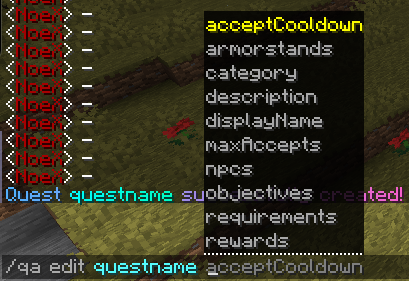
Each thing you write, separated by a space, is called an argument. In the following pictures, edit, and questname are the two arguments:
If you press space after the last argument, our intelligent command system will show you what argument comes "next". If you're stuck with a command, just make sure the last character is a space and read the command completions!
Still stuck?
If the command completions aren't enough and you still don't know how a command works, just press enter and run the command! It will show you a help menu. Just read it, and it will tell you what arguments it needs and what they do.
Now, the initial Quest Name cannot have any spaces. It's just an identifier for the Quest. However, we can give it a display name which can have spaces - and that's the name the player will actually see!
/qa/qaAdmin commands for NotQuestsediteditOpens subcommands for editing a specific quest.TheVirus<quest>Identifier of the quest to edit; use /qa list to see available quests.Acceptsquest nameExampleTheVirusdisplayNamedisplayNameQuest display name shown in quest lists, quest previews, GUIs, and chat messages. Supports MiniMessage formatting.setsetSets the selected quest's display name shown in GUIs, previews, and chat.A Deadly Virus<display-name>New quest display name. Supports spaces and MiniMessage formatting.Acceptsquest display nameExampleA Deadly Virus
Next, we want to add a description to the Quest, which will be displayed in multiple places, for example if the player tries to preview or take the Quest:
/qa/qaAdmin commands for NotQuestsediteditOpens subcommands for editing a specific quest.TheVirus<quest>Identifier of the quest to edit; use /qa list to see available quests.Acceptsquest nameExampleTheVirusdescriptiondescriptionQuest description shown in quest previews, GUIs, and chat. Supports MiniMessage formatting.setsetSets the selected quest's description text shown to players.A deadly virus has infected the people of Winterfell. You have to murder the infected villagers to prevent the virus from spreading further.<description>New quest description. Supports spaces and MiniMessage formatting.Acceptsquest descriptionExampleA deadly virus has infected the people of Winterfell. You have to murder the infected villagers to prevent the virus from spreading further.
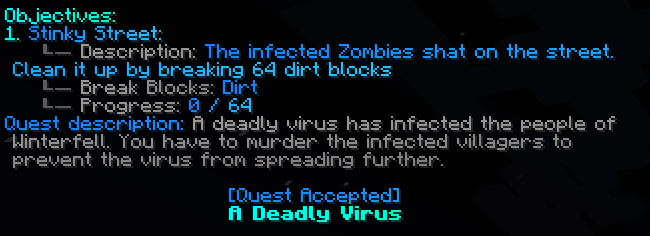
Now, your players will see a beautiful description and display name after accepting the Quest:
Without any requirements, every single player will be able to accept your Quest. However, that Quest we're gonna make will be quite tricky! Let's require the player to have at least 10 Quest Points until they can accept the Quest:
/qa/qaAdmin commands for NotQuestsediteditOpens subcommands for editing a specific quest.TheVirus<quest>Identifier of the quest to edit; use /qa list to see available quests.Acceptsquest nameExampleTheVirusrequirementsrequirementsManages requirements that must pass before the selected quest can be taken.addaddAdds a requirement that must pass before players can take the selected quest.QuestPointsQuestPointsReads or changes the target player's quest points.moreOrEqualThan<operator>How to compare the selected number variable against the expression.Acceptscomparison operatorExamplemoreOrEqualThan10<expression>Number expression to compare with the selected variable value.AcceptsnumberExpressionExample10
Quest Points can be earned by completing Quests, or they can be given out manually.
This is what Players will now see if they try to accept the Quest but don't fulfill the requirements.
In order for us to be able to test our own Quest, give yourself 10 Quest Points:
/qa/qaAdmin commands for NotQuestsquestpointsquestpointsShows or changes a player's quest points.putyourminecraftnamehere<player>Player whose quest points should be shown or changed.AcceptsplayerExampleputyourminecraftnamehereaddaddAdds quest points to the selected player.10<amount>Quest point amount used by this command.Acceptsquest point amountExample10
Objectives are the heart of every Quest. Let's add our first one!
First, the player has to free up the road from all the shit the infected Zombies made:
/qa/qaAdmin commands for NotQuestsediteditOpens subcommands for editing a specific quest.TheVirus<quest>Identifier of the quest to edit; use /qa list to see available quests.Acceptsquest nameExampleTheVirusobjectivesobjectivesManages objectives on the selected quest.addaddAdds a new objective to the selected quest.BreakBlocksBreakBlocksCounts matching blocks broken by the player.dirt<materials>Blocks or NotQuests custom items that count when broken. Supports one value or a comma-separated list.Acceptsitem selectionExampledirt64<amount>Number of matching blocks the player must break. Supports math and NotQuests number variables.AcceptsnumberExpressionExample64
This objective will be completed once the player breaks 64 dirt 👍 If you want to, you can specify multiple materials there. For example, if both dirt or stone is fine for the player to break, just enter dirt,stone there.
Now, let's add a description for that objective:
/qa/qaAdmin commands for NotQuestsediteditOpens subcommands for editing a specific quest.TheVirus<quest>Identifier of the quest to edit; use /qa list to see available quests.Acceptsquest nameExampleTheVirusobjectivesobjectivesManages objectives on the selected quest.editeditOpens subcommands for editing a specific objective on the selected quest.1<objectiveId>Objective ID shown by this quest's objectives list.Acceptsobjective idExample1descriptiondescriptionObjective description shown in lists, progress output, and GUIs. Supports MiniMessage formatting.setsetSets the text.The infected Zombies shat on the street. Clean it up by breaking 64 dirt blocks!<Objective Description>New objective description. Supports spaces and MiniMessage formatting.AcceptsObjective DescriptionExampleThe infected Zombies shat on the street. Clean it up by breaking 64 dirt blocks!
And a name:
/qa/qaAdmin commands for NotQuestsediteditOpens subcommands for editing a specific quest.TheVirus<quest>Identifier of the quest to edit; use /qa list to see available quests.Acceptsquest nameExampleTheVirusobjectivesobjectivesManages objectives on the selected quest.editeditOpens subcommands for editing a specific objective on the selected quest.1<objectiveId>Objective ID shown by this quest's objectives list.Acceptsobjective idExample1displayNamedisplayNameObjective display name shown in quest progress, objective lists, GUIs, and task messages. Supports MiniMessage formatting.setsetSets the text.Stinky Street<DisplayName>New objective display name. Supports spaces and MiniMessage formatting.AcceptsDisplayNameExampleStinky Street
Let's accept our Quest by using /q/qPlayer commands for NotQueststaketakeTakes or accepts a quest.TheVirus<questName>Identifier of the quest you want to start.Acceptsquest nameExampleTheVirus:
Onto our next objective! The street is clear! The player should now kill all the infected villagers:
/qa/qaAdmin commands for NotQuestsediteditOpens subcommands for editing a specific quest.TheVirus<quest>Identifier of the quest to edit; use /qa list to see available quests.Acceptsquest nameExampleTheVirusobjectivesobjectivesManages objectives on the selected quest.addaddAdds a new objective to the selected quest.KillMobsKillMobsCounts matching mobs killed by the player.zombie_villager<entityType>Entity type the player must kill, or `any` to count every mob.Acceptsentity type or anyExamplezombie_villager15<amount>Number of matching mobs the player must kill.AcceptsnumberExpressionExample15
After 15 kills of Zombie Villagers, that objective will be completed! Now let's add an objective description and name:
/qa/qaAdmin commands for NotQuestsediteditOpens subcommands for editing a specific quest.TheVirus<quest>Identifier of the quest to edit; use /qa list to see available quests.Acceptsquest nameExampleTheVirusobjectivesobjectivesManages objectives on the selected quest.editeditOpens subcommands for editing a specific objective on the selected quest.2<objectiveId>Objective ID shown by this quest's objectives list.Acceptsobjective idExample2descriptiondescriptionObjective description shown in lists, progress output, and GUIs. Supports MiniMessage formatting.setsetSets the text.You can see the infected villagers in front of you! Murder them all to stop the virus from spreading!<Objective Description>New objective description. Supports spaces and MiniMessage formatting.AcceptsObjective DescriptionExampleYou can see the infected villagers in front of you! Murder them all to stop the virus from spreading!
/qa/qaAdmin commands for NotQuestsediteditOpens subcommands for editing a specific quest.TheVirus<quest>Identifier of the quest to edit; use /qa list to see available quests.Acceptsquest nameExampleTheVirusobjectivesobjectivesManages objectives on the selected quest.editeditOpens subcommands for editing a specific objective on the selected quest.2<objectiveId>Objective ID shown by this quest's objectives list.Acceptsobjective idExample2displayNamedisplayNameObjective display name shown in quest progress, objective lists, GUIs, and task messages. Supports MiniMessage formatting.setsetSets the text.Zombies ahead!<DisplayName>New objective display name. Supports spaces and MiniMessage formatting.AcceptsDisplayNameExampleZombies ahead!
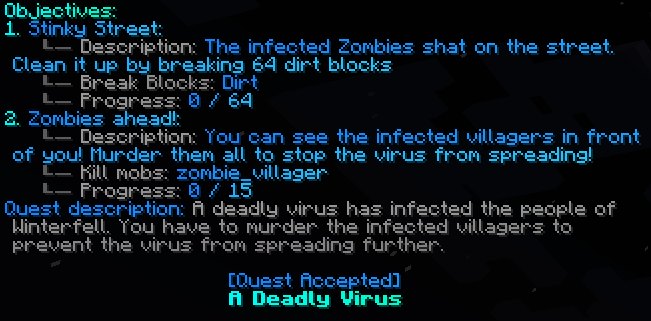
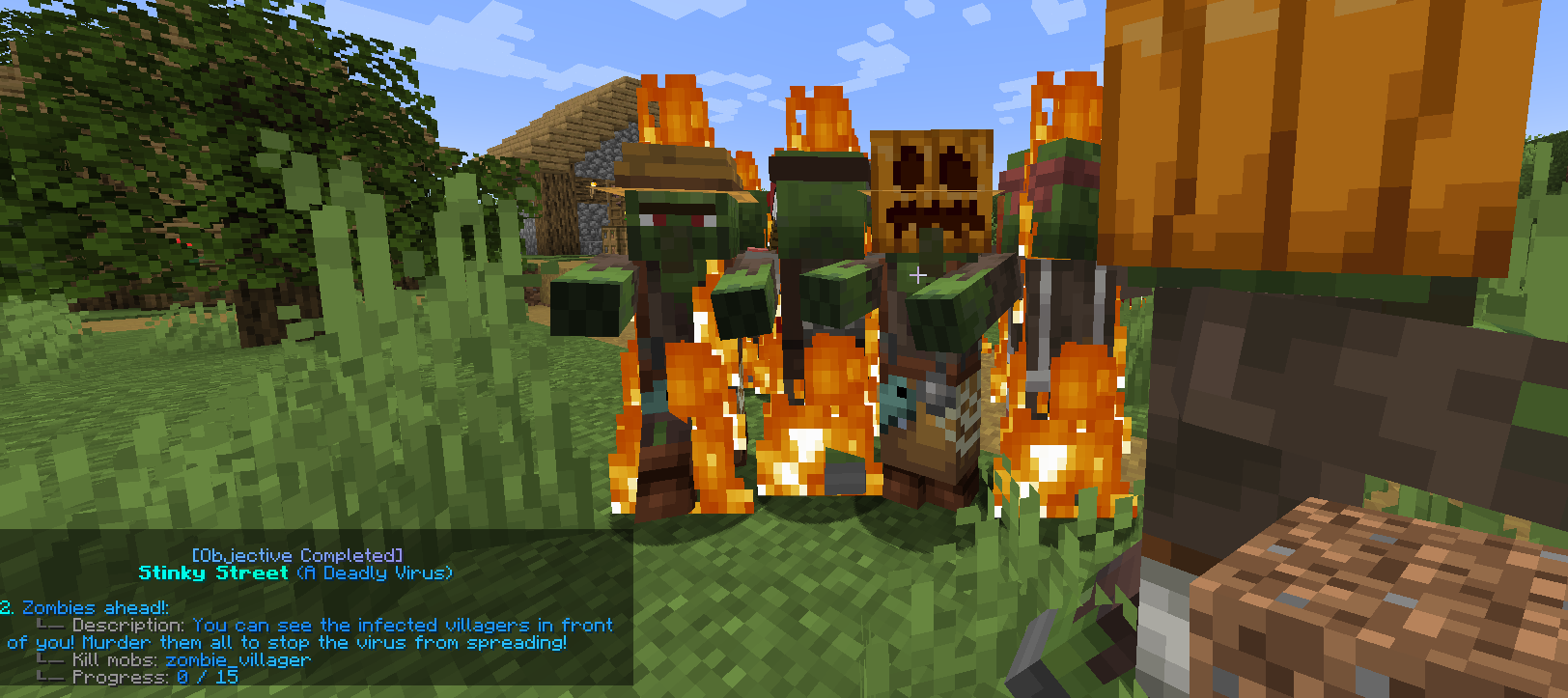
Now, after accepting this Quest, you will see this:
As you see, both objectives are visible. You can also complete them in no particular order.
However, we want the second Objective, "Zombies ahead!" to only be visible and complete-able after the first Objective is completed.
To accomplish that, we need to add a condition to the second objective which makes it so the player needs to complete objective 1 first. There's two ways to achieve this in NotQuests (choose just one):
Easy way: /qa/qaAdmin commands for NotQuestsediteditOpens subcommands for editing a specific quest.TheVirus<quest>Identifier of the quest to edit; use /qa list to see available quests.Acceptsquest nameExampleTheVirusobjectivesobjectivesManages objectives on the selected quest.predefinedProgressOrderpredefinedProgressOrderConfigures the required progress order for objectives in this branch.setsetChanges the objective progress order.firstToLastfirstToLastRequires objectives to progress from first to last.. This also automatically sets the correct, same order for any future objectives you may add to this quest.
Harder way: /qa/qaAdmin commands for NotQuestsediteditOpens subcommands for editing a specific quest.TheVirus<quest>Identifier of the quest to edit; use /qa list to see available quests.Acceptsquest nameExampleTheVirusobjectivesobjectivesManages objectives on the selected quest.editeditOpens subcommands for editing a specific objective on the selected quest.2<objectiveId>Objective ID shown by this quest's objectives list.Acceptsobjective idExample2conditionsconditionsManages conditions attached to the selected objective.unlockunlockConfigures conditions required before the objective can unlock.addaddAdds a condition to this objective condition group.CompletedObjectiveCompletedObjectiveChecks whether another objective in the same quest has already been completed.1<dependingObjectiveId>Objective ID that must already be completed before this condition is fulfilled.AcceptsintegerExample1. You'd need to set this for every single objective of that quest. However, this way may give you more flexibility.
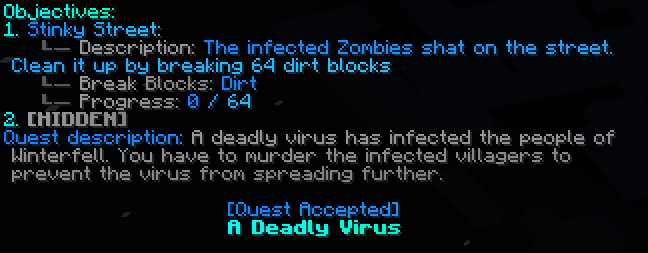
Done! If we take the Quest now, the second objective is hidden:
It will be unlocked once you complete the first objective 😀
With Triggers, we can add some action to the Quest!
When the user reaches the second objective and has to kill the Zombie Villagers, he will notice one thing: There are no Zombie Villagers to kill. Why would they?
Let's make NotQuests spawn some Zombie Villagers for him once he reaches the second objective.
First, we need to create the action which spawns the zombie villagers. Actions can be created outside of Quests and re-used for every quest. Let's make a SpawnMob Action:
/qa/qaAdmin commands for NotQuestsactionsactionsManages saved actions, inline actions, and action execution.addaddCreates a new saved action.Spawn15ZombieVillagers<actionName>Name used to save this action.Acceptsaction nameExampleSpawn15ZombieVillagersSpawnMobSpawnMobSpawns vanilla, MythicMobs, or EcoMobs entities at a player or fixed location.zombie_villager<entityType>Entity type or custom mob id to spawn.Acceptsentity type or anyExamplezombie_villager15<amount>Number of mobs to spawn.AcceptsamountExample15PlayerLocationPlayerLocationSpawns mobs at the target player's current location.
This action spawns 15 zombie villagers at the location wherever the player taking this Quest currently is 😄
Now, let's add the trigger with this action to our Quest:
/qa/qaAdmin commands for NotQuestsediteditOpens subcommands for editing a specific quest.TheVirus<quest>Identifier of the quest to edit; use /qa list to see available quests.Acceptsquest nameExampleTheVirustriggerstriggersManages triggers attached to this quest.addaddAdds a trigger that runs an action when the selected quest changes state.Spawn15ZombieVillagers<action>Action which will be executed when the trigger runs.Acceptssaved action nameExampleSpawn15ZombieVillagersBEGINBEGINRuns the selected action when the quest starts or an objective unlocks.--applyOn--applyOnQuest or objective target this trigger, action, or condition should apply to, such as Quest, O1, or O2.Acceptsquest or objective targetO2Value for --applyOnQuest or objective target this trigger, action, or condition should apply to, such as Quest, O1, or O2.Acceptsquest or objective targetExampleO2--world_name--world_nameWorld name filter for world enter/leave triggers, or ALL for every world.Acceptsworld nameALLValue for --world_nameWorld name filter for world enter/leave triggers, or ALL for every world.Acceptsworld nameExampleALL
This runs the action "Spawn15ZombieVillagers" once we BEGIN O2 (objective 2) in ALL worlds (not limited to any world). Feel free to test it out — it will work 👍
Your players will murder you if they waste their time on this super hard Quest without receiving any rewards. So let's add some:
+2 Quest Points: /qa/qaAdmin commands for NotQuestsediteditOpens subcommands for editing a specific quest.TheVirus<quest>Identifier of the quest to edit; use /qa list to see available quests.Acceptsquest nameExampleTheVirusrewardsrewardsManages rewards granted by the selected quest.addaddAdds a reward granted by the selected quest.QuestPointsQuestPointsReads or changes the target player's quest points.add<operator>How to change the number variable: set, add, deduct, multiply, or divide.Acceptsaction operatorExampleadd2<expression>Number expression used as the input value for this variable action.AcceptsnumberExpressionExample2
2 Swords: /qa/qaAdmin commands for NotQuestsediteditOpens subcommands for editing a specific quest.TheVirus<quest>Identifier of the quest to edit; use /qa list to see available quests.Acceptsquest nameExampleTheVirusrewardsrewardsManages rewards granted by the selected quest.addaddAdds a reward granted by the selected quest.GiveItemGiveItemGives one or more materials or NotQuests custom items to the target player.hand<material>Material, NotQuests custom item, hand item, any item, or comma-separated item selection to give.Acceptsitem selectionExamplehand2<amount>Amount of each selected item stack to give.AcceptsintegerExample2
For this reward, you have to hold the item in your hand while running that command. Otherwise, you can also run /qa/qaAdmin commands for NotQuestsediteditOpens subcommands for editing a specific quest.TheVirus<quest>Identifier of the quest to edit; use /qa list to see available quests.Acceptsquest nameExampleTheVirusrewardsrewardsManages rewards granted by the selected quest.addaddAdds a reward granted by the selected quest.GiveItemGiveItemGives one or more materials or NotQuests custom items to the target player.wooden_sword<material>Material, NotQuests custom item, hand item, any item, or comma-separated item selection to give.Acceptsitem selectionExamplewooden_sword2<amount>Amount of each selected item stack to give.AcceptsintegerExample2
+300 Money (if you have Vault installed): /qaeditTheVirusrewardsaddMoneyadd300
Want to give a reward from some other plugin via commands? You can use the {PLAYER} placeholder there. Example: /qa/qaAdmin commands for NotQuestsediteditOpens subcommands for editing a specific quest.TheVirus<quest>Identifier of the quest to edit; use /qa list to see available quests.Acceptsquest nameExampleTheVirusrewardsrewardsManages rewards granted by the selected quest.addaddAdds a reward granted by the selected quest.ConsoleCommandConsoleCommandRuns a server command from the console.cr give to {PLAYER} DailyCrate 2<command>Command executed by the server console. The leading slash is optional.AcceptscommandExamplecr give to {PLAYER} DailyCrate 2
Once you complete the Quest, you will receive the rewards, but the player won't notice. That's because rewards are hidden (can be changed in the config) by default unless you give them a display name! So let's do that:
/qa/qaAdmin commands for NotQuestsediteditOpens subcommands for editing a specific quest.TheVirus<quest>Identifier of the quest to edit; use /qa list to see available quests.Acceptsquest nameExampleTheVirusrewardsrewardsManages rewards granted by the selected quest.editeditOpens subcommands for editing a specific reward.1<reward-id>Reward ID shown by the reward list.Acceptsreward idExample1displayNamedisplayNameReward display name shown in reward previews and reward lists. Supports MiniMessage formatting.setsetSets the text.+2 Quest Points<DisplayName>New reward display name. Supports spaces and MiniMessage formatting.AcceptsDisplayNameExample+2 Quest Points
/qa/qaAdmin commands for NotQuestsediteditOpens subcommands for editing a specific quest.TheVirus<quest>Identifier of the quest to edit; use /qa list to see available quests.Acceptsquest nameExampleTheVirusrewardsrewardsManages rewards granted by the selected quest.editeditOpens subcommands for editing a specific reward.2<reward-id>Reward ID shown by the reward list.Acceptsreward idExample2displayNamedisplayNameReward display name shown in reward previews and reward lists. Supports MiniMessage formatting.setsetSets the text.+2 handcrafted Wooden Swords<DisplayName>New reward display name. Supports spaces and MiniMessage formatting.AcceptsDisplayNameExample+2 handcrafted Wooden Swords
/qa/qaAdmin commands for NotQuestsediteditOpens subcommands for editing a specific quest.TheVirus<quest>Identifier of the quest to edit; use /qa list to see available quests.Acceptsquest nameExampleTheVirusrewardsrewardsManages rewards granted by the selected quest.editeditOpens subcommands for editing a specific reward.3<reward-id>Reward ID shown by the reward list.Acceptsreward idExample3displayNamedisplayNameReward display name shown in reward previews and reward lists. Supports MiniMessage formatting.setsetSets the text.+300 Coins<DisplayName>New reward display name. Supports spaces and MiniMessage formatting.AcceptsDisplayNameExample+300 Coins
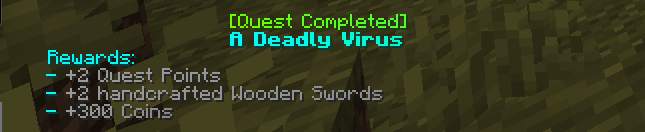
Done! Once you finish the Quest, you will see the rewards:
We don't want the player to take this Quest over and over and over and over again after they completed it. Let's limit that.
First, let's make it, so they can only accept it only when it has not been completed less than 20 hours ago:
/qa/qaAdmin commands for NotQuestsediteditOpens subcommands for editing a specific quest.TheVirus<quest>Identifier of the quest to edit; use /qa list to see available quests.Acceptsquest nameExampleTheVirusacceptCooldownacceptCooldownConfigures the cooldown before this quest can be accepted again.completecompleteApplies this cooldown after quest completion.setsetSets the cooldown players must wait after completing this quest before accepting it again.20h<duration>New cooldown duration, such as 30s, 500ms, 10m, or 2h.AcceptsdurationExample20h
20h = 20 hours. Now, let's give it a hard limit of 10 Quest completions. After 10 completions, the player cannot accept the Quest anymore, no matter how long they wait:
/qa/qaAdmin commands for NotQuestsediteditOpens subcommands for editing a specific quest.TheVirus<quest>Identifier of the quest to edit; use /qa list to see available quests.Acceptsquest nameExampleTheViruslimitslimitsConfigures quest accept, completion, and fail limits.completionscompletionsConfigures how many times players may complete this quest.10<max-completions>Maximum completions allowed. Use -1 for unlimited.Acceptsmaximum completionsExample10
Wanna make it so they cannot accept the quest if they have failed or aborted it 3 times or more? Easy:
/qa/qaAdmin commands for NotQuestsediteditOpens subcommands for editing a specific quest.TheVirus<quest>Identifier of the quest to edit; use /qa list to see available quests.Acceptsquest nameExampleTheViruslimitslimitsConfigures quest accept, completion, and fail limits.failsfailsConfigures how many times players may fail this quest.3<max-fails>Maximum failures allowed. Use -1 for unlimited.Acceptsmaximum failsExample3
Alternatively, you could also prevent them from aborting the quest in the first place:
/qa/qaAdmin commands for NotQuestsediteditOpens subcommands for editing a specific quest.TheVirus<quest>Identifier of the quest to edit; use /qa list to see available quests.Acceptsquest nameExampleTheVirusabortEnabledabortEnabledControls whether players may abort this quest.false<abort-enabled>Whether players can abort this quest with /notquests abort.Acceptsabort enabledExamplefalse
At last, let's set takeEnabled to false:
/qa/qaAdmin commands for NotQuestsediteditOpens subcommands for editing a specific quest.TheVirus<quest>Identifier of the quest to edit; use /qa list to see available quests.Acceptsquest nameExampleTheVirustakeEnabledtakeEnabledControls whether players may take this quest.false<take-enabled>Whether players can accept this quest with /notquests take.Acceptstake enabledExamplefalse
This will make it, so the player cannot take the Quest using the /q/qPlayer commands for NotQueststaketakeTakes or accepts a quest.TheVirus<questName>Identifier of the quest you want to start.Acceptsquest nameExampleTheVirus command. Instead, they have to take it by either right-clicking a Quest Giver NPC or a Quest Giver armor stand. More regarding that in the next section:
Use /q/qPlayer commands for NotQueststaketakeTakes or accepts a quest.TheVirus<questName>Identifier of the quest you want to start.Acceptsquest nameExampleTheVirus to take the quest! You can also bind it to an armor stand on either platform with /qa/qaAdmin commands for NotQuestsediteditOpens subcommands for editing a specific quest.TheVirus<quest>Identifier of the quest to edit; use /qa list to see available quests.Acceptsquest nameExampleTheVirusarmorstandsarmorstandsManages armor stands attached as quest givers.addaddGives a player the tool used to attach this quest to an armor stand.. Paper servers can additionally use Citizens or FancyNPCs, for example /qa/qaAdmin commands for NotQuestsediteditOpens subcommands for editing a specific quest.<quest><quest>Identifier of the quest to edit; use /qa list to see available quests.Acceptsquest namenpcsnpcsManages NPCs attached to this quest.addaddAttaches the selected quest to an NPC or armor stand quest giver.citizens:<id><npc>Citizens NPC, FancyNPC, armor stand, or right-click selector to attach this quest to.AcceptsNPC selectorExamplecitizens:5.
The quest is saved in default/quests.yml and default/actions.yml inside the NotQuests data folder. That folder is plugins/NotQuests on Paper and <world>/notquests on NeoForge.
You can group Quests together in categories. Categories are just a way to organize your Quests. Let's create a category called "Virus Quests":
/qa/qaAdmin commands for NotQuestscategoriescategoriesManages quest categories.createcreateCreates a new quest category.VirusQuests<categoryName>Category identifier to create.Acceptscategory nameExampleVirusQuests
Now let's move our quest to that category (by default, it's in a category called "default").
/qa/qaAdmin commands for NotQuestsediteditOpens subcommands for editing a specific quest.TheVirus<quest>Identifier of the quest to edit; use /qa list to see available quests.Acceptsquest nameExampleTheViruscategorycategoryShows or changes the category assigned to the selected quest.setsetMoves the selected quest into another category.VirusQuests<category>New category for this quest.Acceptscategory nameExampleVirusQuests
Done - that easy! Each Quest can only belong to one single category. Categories also determine the folder structure of NotQuests - and they'll even determine how it's displayed in the GUI!
Each category can also have sub-categories. There can be unlimited sub-categories, and you can nest them how deep you want. Example of creating a category "Zombies" as a sub-category of "VirusQuests": /qa/qaAdmin commands for NotQuestscategoriescategoriesManages quest categories.createcreateCreates a new quest category.VirusQuests.Zombies<categoryName>Category identifier to create.Acceptscategory nameExampleVirusQuests.Zombies
The name we specified above is also just the categorie's identifier. You can add a display name (which is what the player will actually see). It can contain spaces, or even color codes, just like quest names! Example:
/qa/qaAdmin commands for NotQuestscategoriescategoriesManages quest categories.editeditOpens subcommands for editing a quest category.VirusQuests<category>Category to edit.Acceptscategory nameExampleVirusQuestsdisplayNamedisplayNameCategory display name shown in category GUIs and category lists. Supports MiniMessage formatting.setsetSets the selected category's display name.<dark_green>Virus Quests <main>(dangerous)<display-name>New category display name. Supports spaces and MiniMessage formatting.Acceptsdisplay name
Remember the predefinedProgressOrder trick we used to make objectives complete in order? Categories have the exact same thing — but for the quests inside them. This is perfect for story chapters: drop your quests into a category and force players to do them one after another, without manually chaining a condition onto every single quest.
/qa/qaAdmin commands for NotQuestscategoriescategoriesManages quest categories.editeditOpens subcommands for editing a quest category.VirusQuests<category>Category to edit.Acceptscategory nameExampleVirusQuestspredefinedProgressOrderpredefinedProgressOrderConfigures the required progress order for quests inside this category.setsetChanges the selected category's predefined progress order.firstToLastfirstToLastRequires quests in this category to be progressed from first to last.
Now players have to finish the quests in this category from the first to the last. Your options:
set firstToLast - quests must be done top to bottom.
set lastToFirst - quests must be done bottom to top.
set custom <quest order> - you pick the exact order (quest names separated by spaces).
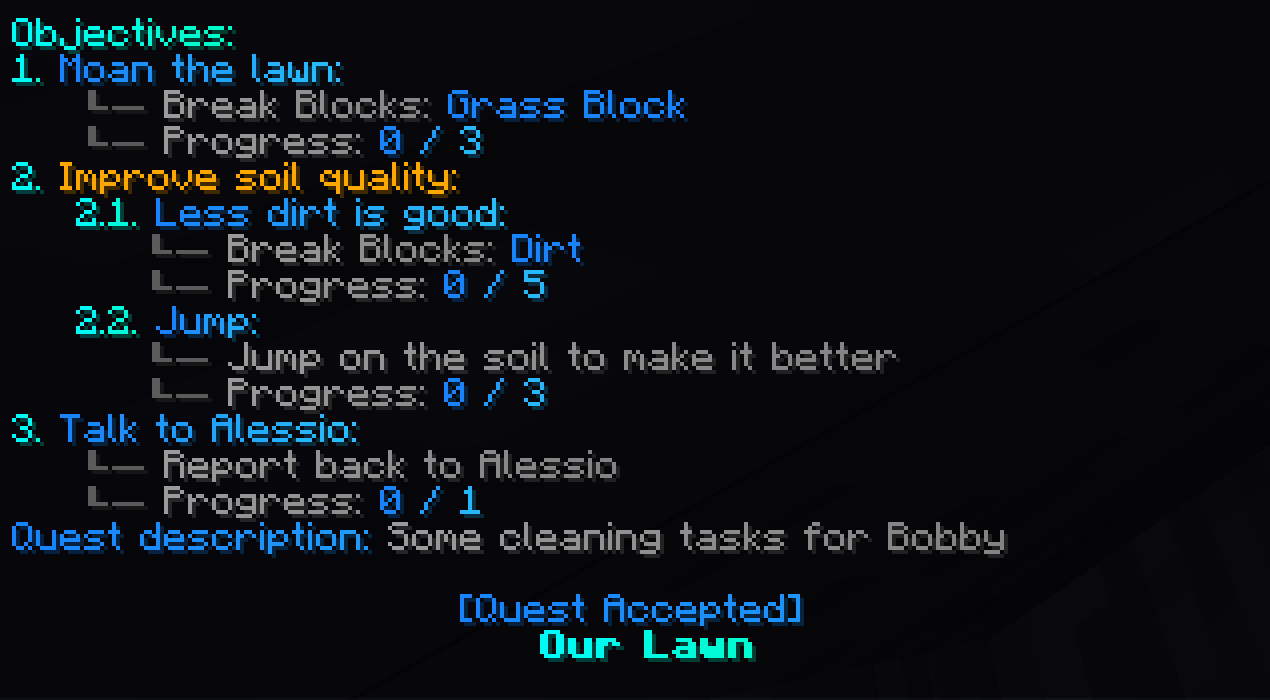
NotQuests supports sub-objectives! Each objective can have unlimited sub-objective. And each sub-objective can also have unlimited sub-sub-objectives.. and so on!
For that, there exists an "Objective" objective which is just meant as a holder for sub-objectives. In the screenshot, that would be "Improve soil quality".
Although any objective can have sub-objectives.
If you add sub-objectives to an "Objective" objective, it's completed once all its sub-objectives have been completed.
If you add sub-objectives to any other objective, you're only able to progress on it once all its sub-objectives have been completed.
Example:
/qa/qaAdmin commands for NotQuestsediteditOpens subcommands for editing a specific quest.quest<quest>Identifier of the quest to edit; use /qa list to see available quests.Acceptsquest nameExamplequestobjectivesobjectivesManages objectives on the selected quest.addaddAdds a new objective to the selected quest.ObjectiveObjectiveCreates a named parent objective that can contain sub-objectives."<gold>Improve soil quality"<objectiveHolderName>Display name for this objective group.AcceptsgreedyTextExample"<gold>Improve soil quality"
/qa/qaAdmin commands for NotQuestsediteditOpens subcommands for editing a specific quest.quest<quest>Identifier of the quest to edit; use /qa list to see available quests.Acceptsquest nameExamplequestobjectivesobjectivesManages objectives on the selected quest.editeditOpens subcommands for editing a specific objective on the selected quest.1<objectiveId>Objective ID shown by this quest's objectives list.Acceptsobjective idExample1objectivesobjectivesManages child objectives inside the selected objective.addaddAdds a child objective to the selected objective.BreakBlocksBreakBlocksCounts matching blocks broken by the player.dirt<materials>Blocks or NotQuests custom items that count when broken. Supports one value or a comma-separated list.Acceptsitem selectionExampledirt5<amount>Number of matching blocks the player must break. Supports math and NotQuests number variables.AcceptsnumberExpressionExample5
/qa/qaAdmin commands for NotQuestsediteditOpens subcommands for editing a specific quest.quest<quest>Identifier of the quest to edit; use /qa list to see available quests.Acceptsquest nameExamplequestobjectivesobjectivesManages objectives on the selected quest.editeditOpens subcommands for editing a specific objective on the selected quest.1<objectiveId>Objective ID shown by this quest's objectives list.Acceptsobjective idExample1objectivesobjectivesManages child objectives inside the selected objective.editeditOpens subcommands for editing a child objective inside the selected objective.1<objectiveId2>Child objective ID shown inside the selected parent objective.Acceptschild objective idExample1displayNamedisplayNameObjective display name shown in quest progress, objective lists, GUIs, and task messages. Supports MiniMessage formatting.setsetSets the text.Less dirt is good<DisplayName>New objective display name. Supports spaces and MiniMessage formatting.AcceptsDisplayNameExampleLess dirt is good
/qa/qaAdmin commands for NotQuestsediteditOpens subcommands for editing a specific quest.quest<quest>Identifier of the quest to edit; use /qa list to see available quests.Acceptsquest nameExamplequestobjectivesobjectivesManages objectives on the selected quest.editeditOpens subcommands for editing a specific objective on the selected quest.1<objectiveId>Objective ID shown by this quest's objectives list.Acceptsobjective idExample1objectivesobjectivesManages child objectives inside the selected objective.addaddAdds a child objective to the selected objective.JumpJumpCounts times the player jumps.3.0<amount>Number of jumps required.AcceptsnumberExpressionExample3.0--taskDescription--taskDescriptionCustom task text shown to players for this objective instead of the default description.Acceptstask description"Jump on the soil to make it better"Value for --taskDescriptionCustom task text shown to players for this objective instead of the default description.Acceptstask descriptionExample"Jump on the soil to make it better"
Earlier in this tutorial, we've explained how you can add objective dependencies via conditions. The command was /qa/qaAdmin commands for NotQuestsediteditOpens subcommands for editing a specific quest.TheVirus<quest>Identifier of the quest to edit; use /qa list to see available quests.Acceptsquest nameExampleTheVirusobjectivesobjectivesManages objectives on the selected quest.editeditOpens subcommands for editing a specific objective on the selected quest.2<objectiveId>Objective ID shown by this quest's objectives list.Acceptsobjective idExample2conditionsconditionsManages conditions attached to the selected objective.unlockunlockConfigures conditions required before the objective can unlock.addaddAdds a condition to this objective condition group.CompletedObjectiveCompletedObjectiveChecks whether another objective in the same quest has already been completed..
However, there are different kinds of conditions you can add to Objectives. This condition is an unclock condition, which determines if the objective is Hidden (= no progress is counted and you cannot complete it) or not.
However, you can ALSO add objective conditions which check if you can progress, or complete the objective. Should be super useful!
Examples:
/qa/qaAdmin commands for NotQuestsediteditOpens subcommands for editing a specific quest.questname<quest>Identifier of the quest to edit; use /qa list to see available quests.Acceptsquest nameExamplequestnameobjectivesobjectivesManages objectives on the selected quest.editeditOpens subcommands for editing a specific objective on the selected quest.1<objectiveId>Objective ID shown by this quest's objectives list.Acceptsobjective idExample1conditionsconditionsManages conditions attached to the selected objective.unlockunlockConfigures conditions required before the objective can unlock.addaddAdds a condition to this objective condition group.FlyingFlyingReads or changes whether the target player is flying.equals<operator>How to compare the selected boolean variable: equals, and, or.Acceptscomparison operatorExampleequalsfalse<expression>Boolean value or expression to compare with the selected variable value.AcceptstextExamplefalse - Unlock condition. That's what you are used to. If you are flying, the objective remains locked / "Hidden"
/qa/qaAdmin commands for NotQuestsediteditOpens subcommands for editing a specific quest.questname<quest>Identifier of the quest to edit; use /qa list to see available quests.Acceptsquest nameExamplequestnameobjectivesobjectivesManages objectives on the selected quest.editeditOpens subcommands for editing a specific objective on the selected quest.1<objectiveId>Objective ID shown by this quest's objectives list.Acceptsobjective idExample1conditionsconditionsManages conditions attached to the selected objective.progressprogressConfigures conditions required while the objective is progressing.addaddAdds a condition to this objective condition group.FlyingFlyingReads or changes whether the target player is flying.equals<operator>How to compare the selected boolean variable: equals, and, or.Acceptscomparison operatorExampleequalsfalse<expression>Boolean value or expression to compare with the selected variable value.AcceptstextExamplefalse - Objective is always shown, but if you are flying, you won't get any positive progress towards it
/qa/qaAdmin commands for NotQuestsediteditOpens subcommands for editing a specific quest.questname<quest>Identifier of the quest to edit; use /qa list to see available quests.Acceptsquest nameExamplequestnameobjectivesobjectivesManages objectives on the selected quest.editeditOpens subcommands for editing a specific objective on the selected quest.1<objectiveId>Objective ID shown by this quest's objectives list.Acceptsobjective idExample1conditionsconditionsManages conditions attached to the selected objective.completecompleteConfigures conditions required before the objective can complete.addaddAdds a condition to this objective condition group.FlyingFlyingReads or changes whether the target player is flying.equals<operator>How to compare the selected boolean variable: equals, and, or.Acceptscomparison operatorExampleequalsfalse<expression>Boolean value or expression to compare with the selected variable value.AcceptstextExamplefalse - Objective is always shown and you always get progress, but it won't complete if you don't fulfill the condition
There are more possible objectives than you think there are. You can add any variable of notquests as an objective! An example would be if you wanted the objective to be "Play 100 minutes":
/qa/qaAdmin commands for NotQuestsediteditOpens subcommands for editing a specific quest.questname<quest>Identifier of the quest to edit; use /qa list to see available quests.Acceptsquest nameExamplequestnameobjectivesobjectivesManages objectives on the selected quest.addaddAdds a new objective to the selected quest.NumberVariableNumberVariableTracks progress from a NotQuests number variable.PlaytimeMinutesPlaytimeMinutesReads or changes the target player's playtime in minutes.moreOrEqualThan<operator>How to compare the number variable against the target expression.Acceptscomparison operatorExamplemoreOrEqualThan100<amount>Target number expression this objective must reach.AcceptsnumberExpressionTokenExample100
What if the player already played for 100 minutes already, though? Let's make it, so the player has to play 100 MORE minutes - counting from the point of accepting the quest/unlocking the objective.
/qa/qaAdmin commands for NotQuestsediteditOpens subcommands for editing a specific quest.questname<quest>Identifier of the quest to edit; use /qa list to see available quests.Acceptsquest nameExamplequestnameobjectivesobjectivesManages objectives on the selected quest.addaddAdds a new objective to the selected quest.NumberVariableNumberVariableTracks progress from a NotQuests number variable.PlaytimeMinutesPlaytimeMinutesReads or changes the target player's playtime in minutes.moreOrEqualThan<operator>How to compare the number variable against the target expression.Acceptscomparison operatorExamplemoreOrEqualThanPlaytimeMinutes+100<amount>Target number expression this objective must reach.AcceptsnumberExpressionTokenExamplePlaytimeMinutes+100
This objective makes it so the player needs to play 100 MORE minutes. This is possible, as you are able to use expressions (math, other variables etc.) in many places in notquests (PlaytimeMinutes+100 is such an expression).
Imagine the possibilities! Dynamic objectives based on how much the player has already done / how strong they are / how much karma or questpoints they collected / how much they earned? An easy task with notquests!
Anywhere you can specify blocks/materials (e.g. the BreakBlocks objective or the GiveItem action/reward), we use our block selector. You can not only specify one single block/material there, but multiple! Here's some examples:
/qa/qaAdmin commands for NotQuestsediteditOpens subcommands for editing a specific quest.questname<quest>Identifier of the quest to edit; use /qa list to see available quests.Acceptsquest nameExamplequestnameobjectivesobjectivesManages objectives on the selected quest.addaddAdds a new objective to the selected quest.BreakBlocksBreakBlocksCounts matching blocks broken by the player.diamond_ore,deepslate_diamond_ore<materials>Blocks or NotQuests custom items that count when broken. Supports one value or a comma-separated list.Acceptsitem selectionExamplediamond_ore,deepslate_diamond_ore20<amount>Number of matching blocks the player must break. Supports math and NotQuests number variables.AcceptsnumberExpressionExample20
Yes! Finally you can make it so both kinds of diamond ore count towards the progress.
Or:
/qa/qaAdmin commands for NotQuestsediteditOpens subcommands for editing a specific quest.questname<quest>Identifier of the quest to edit; use /qa list to see available quests.Acceptsquest nameExamplequestnameobjectivesobjectivesManages objectives on the selected quest.addaddAdds a new objective to the selected quest.PlaceBlocksPlaceBlocksCounts matching blocks placed by the player.hand,acacia_log,spruce_log,birch_log,dark_oak_log<materials>Blocks or NotQuests custom items that count when placed. Supports one value or a comma-separated list.Acceptsitem selectionExamplehand,acacia_log,spruce_log,birch_log,dark_oak_log15<amount>Number of matching blocks the player must place. Supports math and NotQuests number variables.AcceptsnumberExpressionExample15
You can see why that's super useful, right?
This even works in GiveItem actions, so you could give players multiple items at once!
NotQuests expressions are actually really powerful!
NotQuests gives you the ability to make even more complex conditions much easier, if you want to. Boolean comparisons are now possible in expressions. Note: conditions can be used as quest requirements / objective conditions. They are the same.
Few examples of what's now possible:
/qa/qaAdmin commands for NotQuestsconditionsconditionsManages saved conditions that can be reused by quests, objectives, and actions.addaddCreates a saved condition.cname<conditionName>Name used to save this condition.Acceptscondition nameExamplecnameTrueTrueAlways returns true.equals<operator>How to compare the selected boolean variable: equals, and, or.Acceptscomparison operatorExampleequals(Money>10)&Flying<expression>Boolean value or expression to compare with the selected variable value.Acceptstext
This checks if you are flying AND have more than $10
Another way to do this: /qa/qaAdmin commands for NotQuestsconditionsconditionsManages saved conditions that can be reused by quests, objectives, and actions.addaddCreates a saved condition.cname<conditionName>Name used to save this condition.Acceptscondition nameExamplecnameTrueTrueAlways returns true.equals<operator>How to compare the selected boolean variable: equals, and, or.Acceptscomparison operatorExampleequalsCondition(Conditions:Flying&IsRich)<expression>Boolean value or expression to compare with the selected variable value.AcceptstextExampleCondition(Conditions:Flying&IsRich)
Or /qa/qaAdmin commands for NotQuestsconditionsconditionsManages saved conditions that can be reused by quests, objectives, and actions.addaddCreates a saved condition.cname<conditionName>Name used to save this condition.Acceptscondition nameExamplecnameConditionConditionEvaluates a saved NotQuests condition expression for the target player.equals<Conditions>Saved condition expression to evaluate. Use saved condition names with & or | to combine them.AcceptstextExampleequalsFlying&IsRich<operator>How to compare the selected boolean variable: equals, and, or.Acceptscomparison operatorExampleFlying&IsRich
You can also use | (or) operators or ! (negation) when using conditions in an expression.
If your "points" (from the Integer tag) are bigger or equal 4, this action will give you 40$. Otherwise, it will give you 5$. If you want to learn more about the tag system, head to the tag system guide.
Every player with the permission node "notquests.user.profiles" can now create profiles in notquests! 🔥
Each profile has their own quest points, tags active & completed quests etc. This would allow players to start over if they want to, in order to choose a different path, do a speedrun or just to experience your RPG again - or whatever else!
Showing all your current profiles: /notquests/notquestsPlayer commands for NotQuestsprofilesprofilesManages player quest profiles.showshowShows your current quest profile and the other profiles you can switch to. (seen on the screenshot)
Creating a new profile: /notquests/notquestsPlayer commands for NotQuestsprofilesprofilesManages player quest profiles.createcreateCreates a new quest profile for the current player.profilename<profile-name>Quest profile name. Profile names cannot contain spaces.Acceptsprofile nameExampleprofilename
Changing your profile: /notquests/notquestsPlayer commands for NotQuestsprofilesprofilesManages player quest profiles.changechangeSwitches the active player profile.profilename<profile-name>Quest profile name. Profile names cannot contain spaces.Acceptsprofile nameExampleprofilename
Now, start making Quests! On this website, you can find further information about NotQuests and help if you check out the Documentation tab on the top of this page. If you need any help, feel free to join our Discord.